Showing posts with label facebook. Show all posts

Thursday, 3 March 2011

Club Clothing

I've been kept busy recently with quite a few orders for custom t-shirts. A few orders have been for birthday parties (and a hen night), a few one-offs and also some club clothing. The latest order I've been working on is for a club I actually go to myself: Sweat & Steel an offshoot of the martial arts school I attend. Classes consist of kettlebell/conditioning excercises and so they were after performance fitness type clothing rather than just bog standard t-shirts. The range we decided on consists of a mix of moisture wicking advanced fabric training tops and t-shirts and hooded tops. You can see some mock-ups of the range below:


Girls hoodie


I also set up a shop for the club on it's facebook page using the same application I use for my own (payvment) this app allows you to sell direct through your facebook page. The shopping cart payment is powered securly through paypal so facebook itself doesn't get access to anyone's payment details and customers don't even need a paypal account as they can pay using debit/credit cards as a paypal guest. To see the shops click on the "shop now" icon to the left under the profile picture on facebook.

Also payvment have recently launched a new service they see as being a potential contender to the ebay crown, anyone with a facebook shop can now opt for their items to be available in a global Shopping Mall marketplace. It works similar to ebay so items come up in search according to their relevance and again all payment is through paypal. It will be interesting to see if this gets us any more buyers and facebook visitors!

In the meantime if you have any enquiries about getting custom items of clothing/merchandise made up just contact me. I specialise in small to medium orders (of one-offs up) and you're not just limited to t-shirts, in the past I've done bags, aprons, hoodies, hats, laptop covers, phone covers, fashion & sports tops, wallets etc so if you've anything in mind just ask!

Sunday, 21 November 2010

Discount offer

I recently made it up to 1000 fans/likers on my facebook page and to celebrate I wanted to do an offer of some kind, rather than do a giveaway where only one person wins I thought I'd offer a 15% discount to anyone who's a fan/liker. All I ask you to do is suggest my page to 5 or more of your friends, let me know you've done this (either by commenting here on on my facebook) and I'll message a code for 15% off any of my online shops.

Click here or on the picture for more details!

Wednesday, 27 January 2010

Progress and award

It's been a really busy week so I've not been able to update my facebook page yet this week and I'm late posting this (well late by my self-imposed aim to blog at least once weekly!)

But I'm happy as even without it my facebook page fanbase is steadily creeping up, I'm at 89 fans now and I'd planned to do announce a giveaway when I was close to 100 so keep your eyes peeled!

I had another good surprise, last week Minky Magic (maker of lovely vintage inspired accessories) awarded me with my first blog award, the Sunshine Award is awarded to bloggers whose positivity & creativity inspires others in the blog world. I was delighted to recieve this so early into my blogging experience.


The rules for accepting this award are:
Put the logo on your blog or within your post,
Pass the award onto 12 bloggers,
Link the nominees within your post,
Let the nominees know they have received this award by commenting on their blog,
Link to the person from whom you received this award.

So after catching up with the blogs I follow I have decided to pass the award on to:
Created and Felted,Niche Handmade,Mini Felts,Not Just Handbags, Giddy Stuff, Team Awesome, Monkey & Squirrel, Itty Bitty Ninja Kitty, Haptree and Me, Experimentalk, Carl Martin Jewellery, Aviya Glass
Enjoy!

Wednesday, 11 November 2009

Creative facebook profile pictures

You might have noticed that facebook overlaps your profile picture slightly with the light blue banner on your profile page, you can use this to get a bit creative with your picture like those below:

photo from allfacebook.com
To do this you're essentially just playing around with the space that facebook allocates for your profile picture. You need to have some basic knowledge of image editing and access to appropriate software (something along the lines of photoshop, illustrator, corel draw etc). This should work for both personal profiles and pages/groups.

Facebook allows your profile picture to maximum of 200 x 600 pixels, any picture larger than this will be scaled to 200 pixels in width. Firstly this means you can have a picture that's longer than the classic square photo as anything up to 200 pixels wide by 600 long will be displayed without any scaling.

The second thing you can use to your advantage is the fact that facebook usually places your picture 52 pixels above the gray dividing line in the light blue area of the page (shown below with my old, unmodified picture)
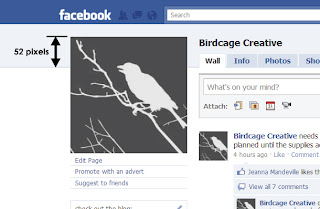
my old page profile picture

You can see this placement actually looks a bit awkward, but with a few tweaks you can make a much nicer effect like those at the top, I'll outline the steps you need to do this.

  • Firstly you have to set up a blan document in your image editing program at 200x600 pixels (or whatever length you want your picture to be) and create a "blank" facebook background, like that shown at the bottom of this post, using the same colours as on the standard profile page. 
  • The gray line appears 52 pixels from the top of the picture, the gray facebook uses is  #D8DFEZ in hex (or in rgb it's 216/223/234) and the line has a stroke of approximately 1 pixel. Above that the light blue box is #EDEFF4 (237/239/244 in rgb). For anyone struggling with this I've included a link to a jpeg I made with a ready-made blank background, just add your own picture to it. To download the jpeg just click on the blank background image at the bottom of this post.
  • Once you have this set up you can paste your image on top, the key here for the effects shown at the top is to have an over lapbetween your image and the base background. To achive this you can mask out part of your picture (like in the peeking out picture below) or simply use a vector image with a transparent background (like I have in my new profile picture). There are several different ways to mask out a background in an image, you can find a quick tutorial on how to do it using the quick mask tool in photoshop here.

photo from walyou.com
  • Now all you have to do is upload your new picture on to your profile (if you hover to the top right of your existing picture on facebook a link to 2change picture" should appear, select "upload" and away you go). 
  • One thing to check after you've uploaded your new picture is that the thumbnail appears as you want it. Again if you hover to the top right of your picture you can select "change picture" then "edit thumbnail". drag the thumbnail box around till you're happy with the picture and save.
I wanted my picture to closer reflect my business card and branding in my online shops so you can see my new one below:
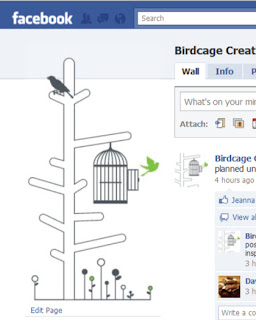
my new profile picture

I said above that the grey line normally appears 52 pixels below the top of the picture, the only thing now that will messes with this placement is if you put up a status update that is longer than one line. This will nudge your picture down as the light blue bar expands to accomodate your update. the way around this is to update your status as normal and then click on the "clear" link which appears next to your profile/page name on the blue bar. This just clears the status from here but it will still appear on your wall and in your friends/fans news feeds.

Hope this helps you alter your profile picture - any questions and example of pictures you create using this tutorial are welcome!

Click here or on the picture below to download the "blank" profile picture background

"blank" profile picture background
Related Posts Plugin for WordPress, Blogger...